
Builder Pattern
We previously discussed one of the structural software design patterns: the Decorator Pattern. Today, we’re diving into another well‑known pattern, one of the creational one, called the Builder pattern.
What is a Builder Design Pattern?
The Builder Pattern is a creational design pattern that simplifies the construction of complex objects. It allows you to create different types or representations of an object using the same construction code, by separating the object’s construction from its representation.
Analogy
Before getting technical, let’s relate the Builder Pattern to a real-life scenario. Imagine you’re ordering a new PC and only care about customizing a few specific components. Instead of configuring every single part, including ones you don’t understand or care about, it would be much better if the PC came with sensible defaults based on the type you choose. From there, you could optionally override the parts you want to customize. This is exactly the kind of flexibility the Builder Pattern gives you in software development.
Concept
The simplest way to define the structure of the builder pattern is the following:
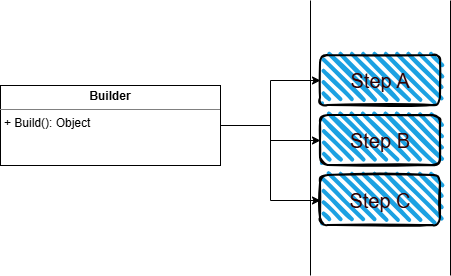
A more complete (though often optional) version looks like this:
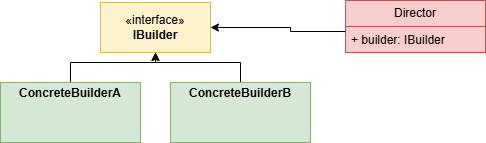
- The
IBuilderinterface declares constructions steps common to all types. - Concrete builders are different implementations with different construction steps and different default values.
- The
Directordefines an order to call in construction steps, to allow the reuse of specific configurations. It is more relevant when the construction steps must follow a strict order.
Simple example using the builder pattern
Assume we’re creating a library that runs Cron jobs. These jobs rely on several options:
- Start Date
- End Date
- Numbers of times to execute
- What to execute
- Cron Expression
Placing all these options in one constructor, or multiple telescoping constructors, leads to unreadable, error‑prone code.
Here’s how it might end up looking like:
public SchedulerOptions(string cronExpression)
    : this(cronExpression, DateTime.Now, DateTime.Now.AddYears(1), null, null)
{
}

public SchedulerOptions(string cronExpression, DateTime startDate)
    : this(cronExpression, startDate, DateTime.Now.AddYears(1), null, null)
{
}

public SchedulerOptions(string cronExpression, DateTime startDate, DateTime endDate)
    : this(cronExpression, startDate, endDate, null, null)
{
}

public SchedulerOptions(string cronExpression, DateTime startDate, DateTime endDate, Action? actionToExecute)
    : this(cronExpression, startDate, endDate, actionToExecute, null)
{
}

public SchedulerOptions(
    string cronExpression,
    DateTime startDate,
    DateTime endDate,
    Action? actionToExecute,
    int? numberOfTimesToExecute)
{
    CronExpression = cronExpression;
    StartDate = startDate;
    EndDate = endDate;
    ActionToExecute = actionToExecute;
    NumberOfTimesToExecute = numberOfTimesToExecute;
}
The Builder Pattern provides a fluent, maintainable solution.
Implementation
We won’t go in depth about the whole Cron scheduler, and we’ll only focus on how to create the options. We’ll first start with the options class:
public class SchedulerOptions(string cronExpression)
{
    public string CronExpression { get; } = cronExpression;
    public DateTime StartDate { get; set; } = DateTime.Now;
    public DateTime EndDate { get; set; } = DateTime.Now.AddYears(1);
    public Action? ActionToExecute { get; set; }
    public int? NumberOfTimesToExecute { get; set; }
}
Consider that our job scheduler will need these options to run. In order to facilitate the creation of these options, we’ll provide our clients with an Options Builder to easily create a different instance for each job, such as the following:
public class SchedulerOptionsBuilder(string cronExpression)
{
    private readonly SchedulerOptions _options = new(cronExpression);

    public SchedulerOptions Build() => _options;

    public SchedulerOptionsBuilder WithStartDate(DateTime startDate)
    {
        _options.StartDate = startDate;
        return this;
    }

    public SchedulerOptionsBuilder WithEndDate(DateTime endDate)
    {
        _options.EndDate = endDate;
        return this;
    }

    public SchedulerOptionsBuilder WithStartAndEndDate(DateTime startDate, DateTime endDate)
    {
        _options.StartDate = startDate;
        _options.EndDate = endDate;
        return this;
    }

    public SchedulerOptionsBuilder WithActionToExecute(Action action)
    {
        _options.ActionToExecute = action;
        return this;
    }

    public SchedulerOptionsBuilder WithNumberOfTimesToExecute(int numberOfTimes)
    {
        _options.NumberOfTimesToExecute = numberOfTimes;
        return this;
    }
}
You can see the different construction steps that we have added to our builder:
- WithStartDate
- WithEndDate
- WithStartAndEndDate
- WithActionToExecute
- WithNumberOfTimesToExecute
They all return the instance of the builder you’re using to allow the client to chain more than one step at a time, for example:
var options = new SchedulerOptionsBuilder("*/5 * * * *")
                  .WithNumberOfTimesToExecute(5)
                  .WithActionToExecute(action)
                  .WithStartDate(startDate)
                  .Build();
If the client doesn’t call any configuration methods, the builder simply returns the default values.
This approach produces clean, expressive code and makes API usage intuitive.
Fun fact
As developers, we use the builder pattern more often than we realize on a daily basis, it shows up almost everywhere in modern APIs and frameworks, and we use it without consciously thinking that this is the builder pattern. Here are the most common examples:
- StringBuilder
- LINQ Query Pipelines
- WebApplicationBuilder
- EF Core: ModelBuilder and QueryBuilder
- DI Configuration
- Configuration Builders in .NET
- FluentValidation library
- Logging Configuration
Final Thoughts
Advantages
- Eliminates telescoping constructors
- Produces readable and fluent client code.
- Can be extended easily.
- Supports the following SOLID principles: Single Responsibility, Open Closed.
Disadvantages
- Introduces additional classes and code - though typically worth the clarity it provides
- Can hide validation issues if not implemented carefully (for example: builder might create incomplete objects)
There you have it! How to implement a simple builder pattern! The demo code can be found here, and if you’re interested in the Cron Scheduler, the full code can be found here
tags: c# - design-patterns - software-development