
Solving the Dual-Write Problem with the Transactional Outbox and Inbox Patterns
In a previous post, I asked the question When should your application use a message broker? In that article I mentioned the transactional outbox pattern, which you should consider whenever you use a message broker. In this post, I’ll explain the pattern itself, and why it should be considered. Since anything can fail at some point, we’ll look at how to protect against those failures and how to implement the pattern using MassTransit in a .NET application.
What happens without the transactional outbox pattern
Suppose you have a POST endpoint /order that the client can use to create a new order. A first implementation might look something like this:
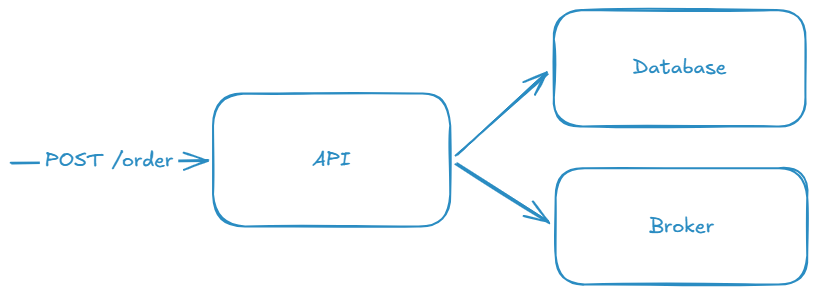
Your backend receives the order, saves it in the database, and then publishes a message that an order has been created so other services can consume it and do their respective work. But given that software can sometimes be unreliable, the following scenarios might happen:
- Your database commits - but the message publish fails
- The message is published - but the database commit fails
- Both succeed, but the database commit is slower than usual, and the consumer of the message can’t find what it’s looking for.
I can probably think of more issues, but that’s enough for now.
The first two scenarios are known as the dual-write problem. How could we avoid them without the outbox pattern? You might have thought about retrying the failed scenario. But how many times do you retry? How long until you return a result to the customer who has just created that order? What if the message broker service is down for 10 minutes or more?
You might delegate publishing the message to a background service and return early to the customer, but again, what happens if publishing keeps failing? How long are you going to keep retrying publishing the message in a background service? If you have a lot of traffic, how will this affect resource usage? If you’re using in-memory storage, what happens if the process crashes or restarts?
No matter which option you choose, it’s going to be complicated and hard to maintain, and it’s probably not going to be 100% reliable and as effective as it should be when something fails.
Introducing the transactional outbox pattern
The transactional outbox pattern aims to eliminate the dual-write problem. It writes the business change and the message into the same transaction. Either both go through, or neither does. To accomplish that it uses the same database where your data lives to store the message, and a separate process, often called the relay, will query that table, publish the message to the broker, and mark it as processed.
With the outbox, the flow looks like this:
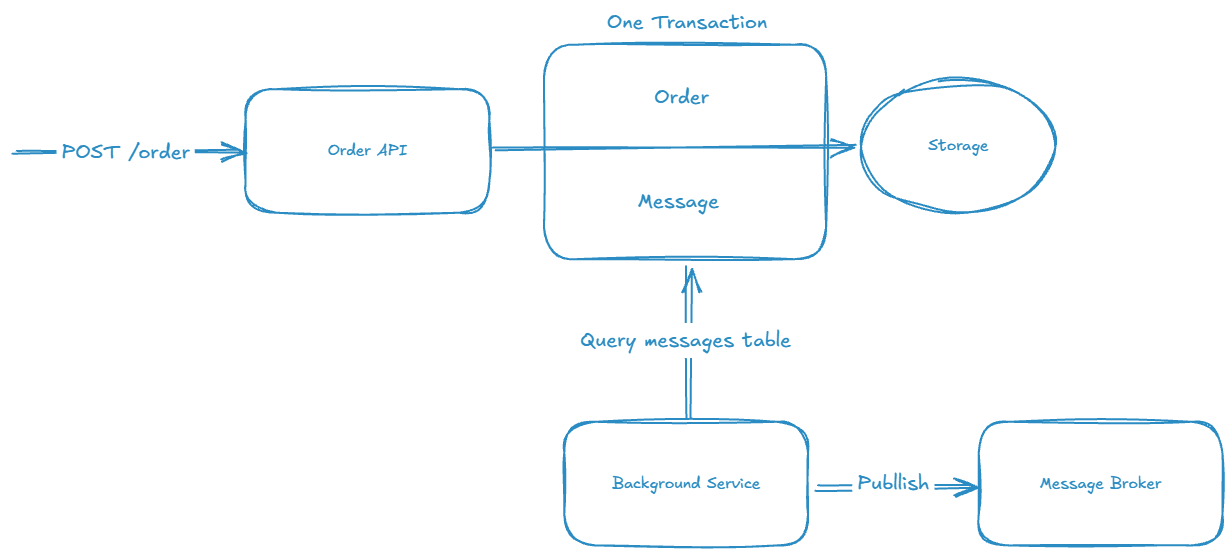
The outbox in this case only works when the message and the business data live in the same database and transaction.
Benefits
No more dual-write
Both your business data and the outbox message are going to be stored together. They are either both committed or both rolled back. You no longer need to manually implement a workaround.
Reliability and consistency
This prevents lost messages if a broker goes down or in case the application crashes during the publishing. If the database write fails, the request fails early and the client finds out immediately.
At-least-once delivery
This guarantees that the message will eventually be published. The background service will only update the outbox message state if the publish succeeds.
Slow-commit race eliminated
As previously explained, if the commit is slower than the publish, the consumers won’t find the data they need. With the outbox pattern, the issue is resolved because both records are committed at the same time, and the message is only published after the commit.
Inbox pattern
When we talk about the outbox pattern, we usually include the inbox pattern as well. Consuming a message can fail just as easily as publishing one. The inbox pattern is a mirror image of the outbox pattern, and here’s how it works:
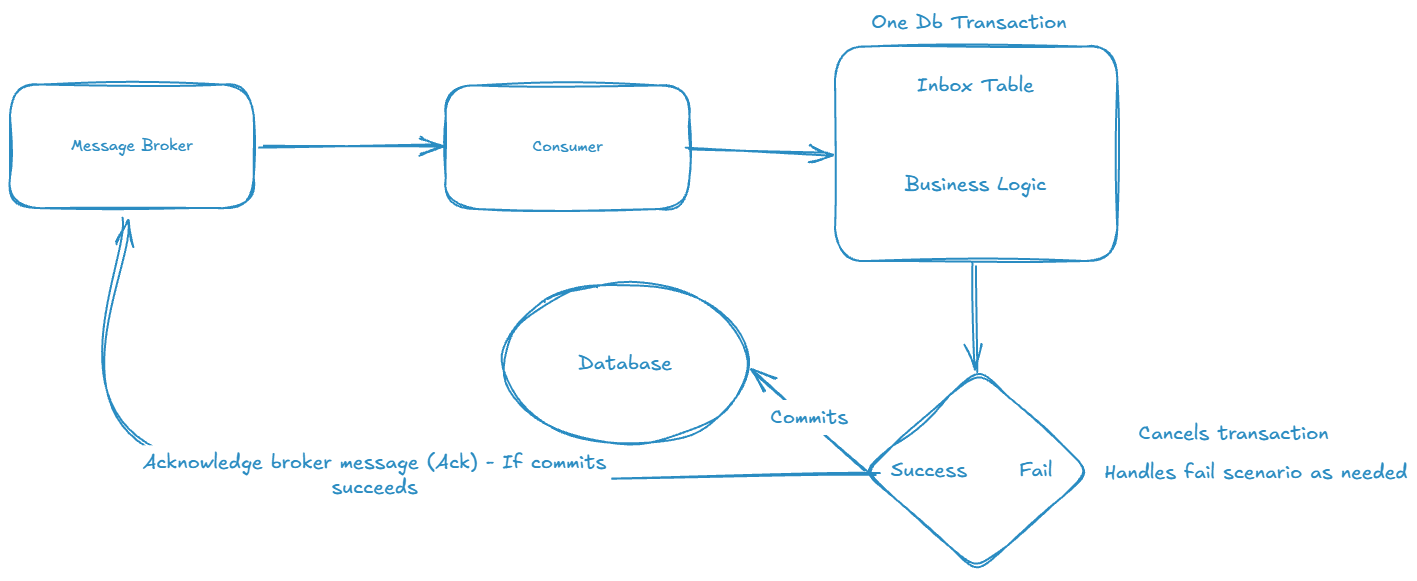
When the consumer receives a message from the broker, it will open a single database transaction. The message received should contain a message_id that is unique. The consumer attempts to insert the message into the inbox table. If the message_id already exists, it will fail and the message can be ignored as a duplicate - but still acknowledge the broker - and this guarantees exactly-once processing of database changes for a given message_id. If it doesn’t, the consumer proceeds to execute the business logic. Keep in mind, this doesn’t eliminate the problem if we’ve got a different message_id for the same event - see the Pitfalls section below.
Once finished, if everything passes the business validation, the transaction will be committed. After a successful commit, the consumer will then send an acknowledgment (ACK) message to the broker to let it know that the message has been processed.
Pitfalls
Because the outbox pattern ensures at-least-once delivery, consumers might receive the same message twice, and sometimes with a different message_id. This could happen for multiple reasons:
- Relay publishes the message and then crashes
- The message doesn’t get marked as sent, and after restart it’s published again. This will produce the same
message_id, and that’s what the inbox pattern exists for.
- The message doesn’t get marked as sent, and after restart it’s published again. This will produce the same
- User clicking on submit order twice due to UI lag
- This will probably trigger the producer to send two different
message_ids for the same business payload.
- This will probably trigger the producer to send two different
- Broker reprocessing - dead letter queue
- Messages routed through a dead letter queue often get assigned a new message wrapper or id - it depends on the tooling you use. Some will retain the same
message_id, while others might change it. It’s worth checking.
- Messages routed through a dead letter queue often get assigned a new message wrapper or id - it depends on the tooling you use. Some will retain the same
This should be handled by making your business logic idempotent, and able to handle duplicates without executing the same job twice. You don’t want to end up shipping the same order twice (or more). In our case, this can be checked by a unique reference that is assigned before the actual order creation. In the demo code below it’s just a reference sent to the API endpoint that can be retrieved from the database later on by the consumer. This way that unique id is created even before the user hits the submit order button.
What’s guaranteed and what isn’t
| Pattern | Protects Against | Does NOT protect against |
|---|---|---|
| Outbox (Producer) | Dual-write failures | External retries duplicating message with different unique ids |
| Inbox (Consumer) | Processing same message_id (technical duplicates) |
Two different message_ids carrying same domain operation |
Practical example using MassTransit and .NET
We’ll be implementing a minimal order-submission API that publishes an order created event that will be consumed by a warehouse service for shipment. The demo only shows how to implement the patterns with MassTransit.
Models
Order Entity:
public class Order
{
    public Guid Id { get; set; }
    public required string Reference { get; set; }
}
Order Created Event:
public record OrderCreated(Guid Id);
Order API Contract:
public class OrderContract
{
    public required string Reference { get; set; }
}
APIs
For both our Order API and Warehouse API we will need the following packages:
- Aspire.Microsoft.EntityFrameworkCore.SqlServer
- MassTransit.RabbitMQ
- MassTransit.EntityFrameworkCore
Order API
Register MassTransit with the Entity Framework outbox:
builder.Services.AddMassTransit(x =>
{
    x.AddEntityFrameworkOutbox<AppDbContext>(o =>
    {
        o.UseSqlServer();
        o.UseBusOutbox();
    });

    x.UsingRabbitMq((context, cfg) =>
    {
        cfg.Host(builder.Configuration.GetConnectionString("rabbitmq"));
        cfg.ConfigureEndpoints(context);
    });
});
Create order endpoint:
app.MapPost("/order", async (OrderContract order, IPublishEndpoint publishEndpoint, AppDbContext dbContext) =>
{
    if (string.IsNullOrWhiteSpace(order.Reference))
    {
        return Results.BadRequest("Reference is required.");
    }

    var orderEntity = new Order
    {
        Id = Guid.CreateVersion7(),
        Reference = order.Reference,
    };

    dbContext.Orders.Add(orderEntity);

    await publishEndpoint.Publish(new OrderCreated(orderEntity.Id));

    await dbContext.SaveChangesAsync();

    return Results.Created($"/order/{orderEntity.Id}", orderEntity);
})
.WithName("CreateOrder");
Because MassTransit is configured with the bus outbox, Publish doesn’t send anything to RabbitMQ. It adds an outbox message to the DbContext, and SaveChangesAsync commits it in the same transaction as the order. A background delivery service then picks up the committed row and publishes it to the broker.
Note that Publish should be called before the SaveChangesAsync, otherwise the outbox row will be added to the context but never saved. It’s a trap you should avoid.
Another common mistake to avoid is injecting IBus instead of IPublishEndpoint or ISendEndpointProvider. IBus sends directly to the broker and won’t go through the outbox.
Warehouse API
We’ll also register MassTransit in our consumer service:
builder.Services.AddMassTransit(x =>
{
    x.AddConsumer<OrderCreatedConsumer>();

    x.AddEntityFrameworkOutbox<AppDbContext>(o =>
    {
        o.UseSqlServer();
        o.UseBusOutbox();
    });

    x.AddConfigureEndpointsCallback((context, name, cfg) =>
    {
        cfg.UseEntityFrameworkOutbox<AppDbContext>(context, opts =>
        {
            opts.MessageDeliveryLimit = 100;
            opts.MessageDeliveryTimeout = TimeSpan.FromSeconds(30);
        });
    });

    x.UsingRabbitMq((context, cfg) =>
    {
        cfg.Host(builder.Configuration.GetConnectionString("rabbitmq"));
        cfg.ConfigureEndpoints(context);
    });
});
Consumer:
public sealed class OrderCreatedConsumer(AppDbContext dbContext) : IConsumer<OrderCreated>
{
    public async Task Consume(ConsumeContext<OrderCreated> context)
    {
        var order = dbContext.Orders.Single(x => x.Id == context.Message.Id);

        var shipment = dbContext.Shipments.SingleOrDefault(x => x.OrderReference == order.Reference);

        if (shipment is not null)
        {
            Console.WriteLine($"Order Consumed {context.Message.Id} - Already Processed");
            return;
        }

        var newShipment = new Shipment
        {
            OrderReference = order.Reference
        };

        dbContext.Shipments.Add(newShipment);
        await dbContext.SaveChangesAsync();

        Console.WriteLine($"Order Consumed {context.Message.Id} - Shipping");
    }
}
Note that this code has a race condition. If two messages arrive at the same time, they’ll both find the shipment to be null. To fix this, you can add a unique index on Shipment.OrderReference.
Entity Framework Integration
Finally, in your AppDbContext you’ll need to add to your model builder the following:
protected override void OnModelCreating(ModelBuilder modelBuilder)
{
    base.OnModelCreating(modelBuilder);

    modelBuilder.AddInboxStateEntity();
    modelBuilder.AddOutboxMessageEntity();
    modelBuilder.AddOutboxStateEntity();
}
And that’s it, a very simple implementation using MassTransit in .NET. You can find the demo code here. All you need to run it is Aspire and Docker (or similar).
Then you can see in the dashboard that both APIs are polling their Outbox and Inbox tables:

And if you test a create order request, you can follow the traces to see how the whole process works from start to finish.
Failure Demo
We can even simulate a broker downtime and how it will pick up the message after it comes back online.
First we stop RabbitMQ service in Aspire dashboard:

Then we call our orders API:
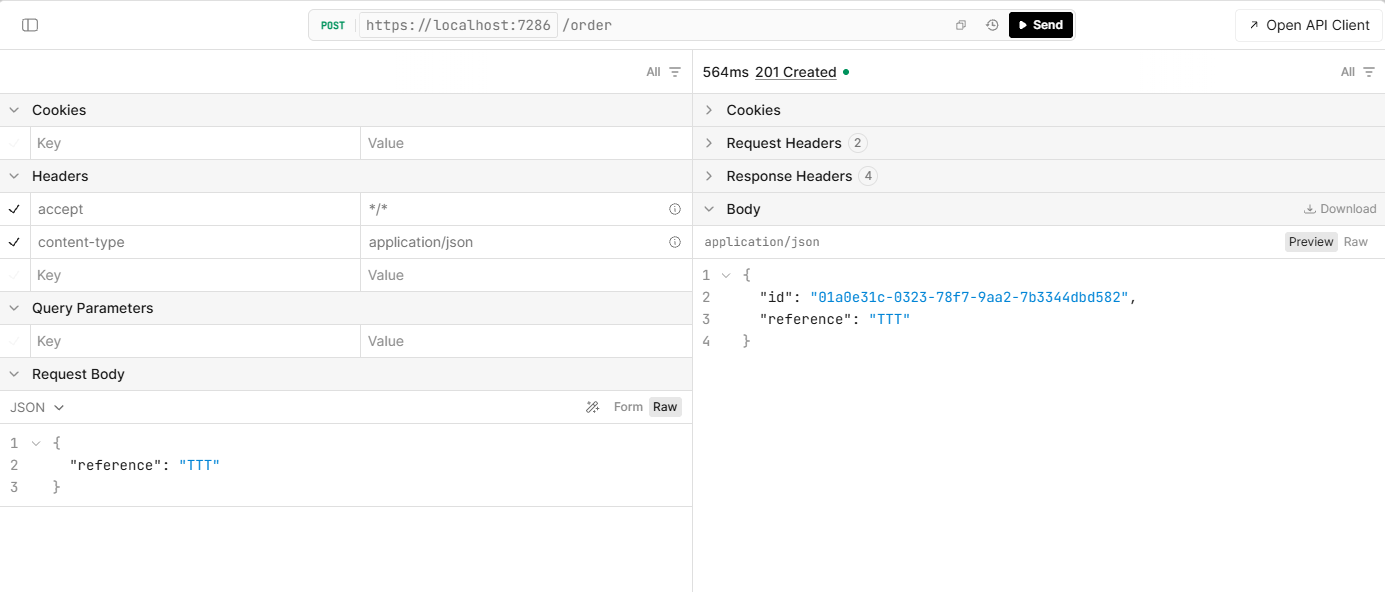
As we can see, despite RabbitMQ being stopped, our API call still succeeds. If we take a look at our OutboxMessage table, we’ll see a record in there waiting to be delivered:

Restart the RabbitMQ service in Aspire dashboard, and the message will be delivered, removed from the OutboxMessage table, and will be found in InboxState. I’ll let you test that for yourselves to avoid posting too many screenshots :). You should see in the logs “Order Consumed XXXXX - Shipping”. Give it a try!
Notes for production
In this demo, we’re using the same database for both the Order API and Warehouse API. It’s simply for quick demonstrations. In your production system, this needs to be evaluated to decide whether you want a single database shared by different services or a dedicated database per service.
MassTransit needs a commercial license starting from v9. If you intend to use it in production, check the licensing information regarding which version you’re using. (The demo is using v8.5.5)
The inbox deduplication window isn’t forever. MassTransit only keeps InboxState rows for a configurable duplicate detection window. A cleanup service then deletes them. A duplicate arriving after the window won’t be caught.
Final thoughts
The transactional outbox pattern is a critical part of messaging in a distributed system. It solves the dual-write problem in an efficient way, and reduces the amount of custom code you need to write. As long as you make sure your consumers are idempotent, you remove a whole class of consistency bugs, and you can concentrate on your business domain rather than the technical details.