
SSE vs SignalR: Targeting Users and Groups in .NET
We previously looked at the difference between SSE and SignalR, specifically in .NET 10, explaining their communication models and how to implement a basic scenario with each of them. I also provided some guidance on choosing the right technology based on your application’s real-time communication needs. However, this is not the whole story, and I wish choosing were that easy. One important subject I left out was the trade-off involved in managing users and groups and sending targeted messages. It’s safe to say that you can achieve this using both SSE and SignalR, in different ways. Let’s look at how to do so together.
Scenario
Let me first explain the scenario that we’re going to work with.
We’ll consider a notification service that sends out different types of notifications:
- Per user
- Per role
- Per event type
- Broadcasting to everyone
We’ll also assume that our backend receives these events through a message bus before pushing them to the client.
We will also need a way for clients to subscribe to or unsubscribe from specific event types, such as payments, orders, shipments, and others.
With that said, we’ll cover the following in this article:
- How to implement this in SignalR
- How to implement this using Server-Sent Events
What we will not cover is:
- Authentication/Authorization (for demo purposes, this is okay - however, do not skip this in production)
- The entire event-generation system (we’ll focus only on the consumer part)
- The front-end
Assumptions
Since this is a conceptual example, and not production-ready, note the following:
- Authentication is simplified for demo purposes
- userId is a stable unique identifier
- roles are known claims
- subscription names are normalized
SignalR
SignalR allows messages to be sent to all connections associated with a specific user and to named groups of connections.
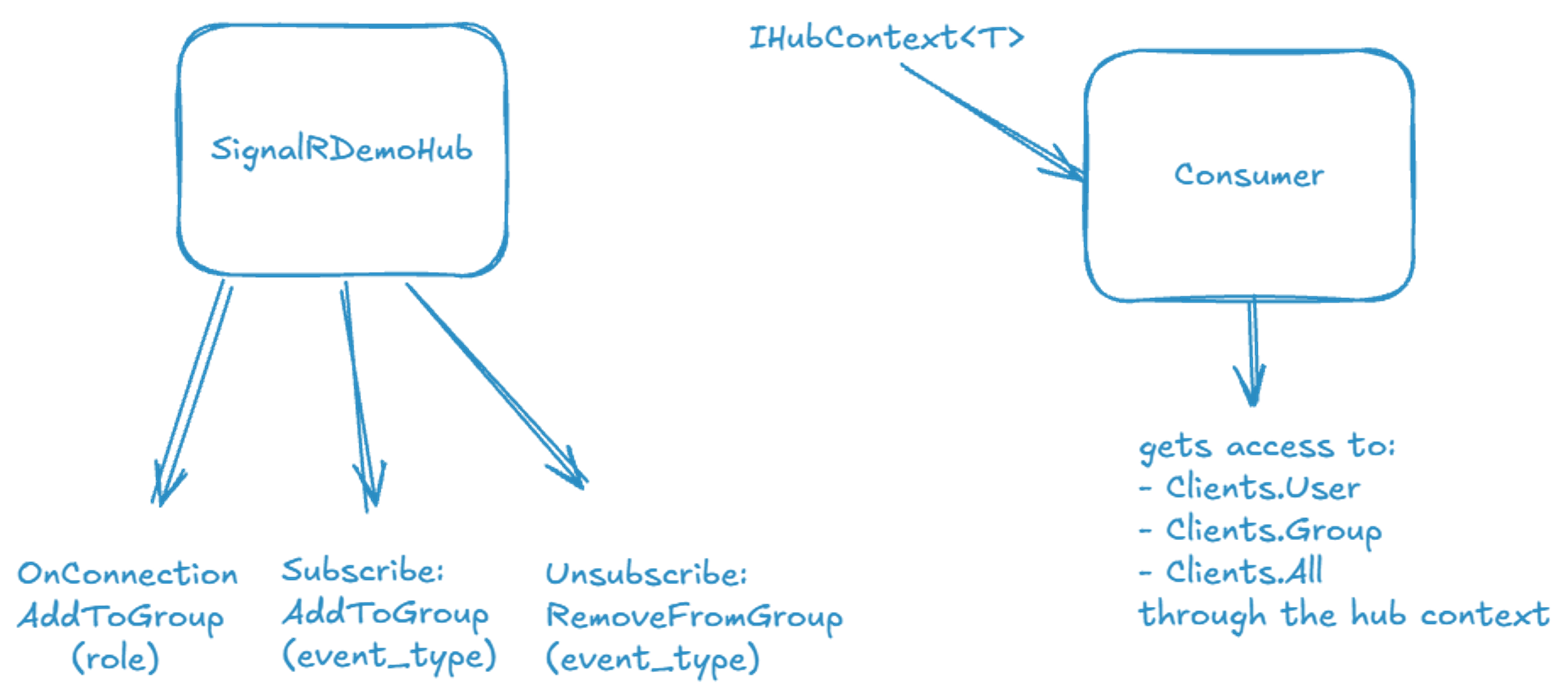
The hub provides access to Clients.User(string userId) method that sends a message to a specific user, to Clients.Group(string groupName) method that sends a message to a specified group, and to Clients.All property that allows us to send a message to all connected clients.
The hub
Let’s first look at how to design our hub. It has to add a user to a group when the user connects, and provide a way to subscribe/unsubscribe from event type messages.
public sealed class DemoHub : Hub
{
}
To be able to do something when a client connects to our hub, we’ll need to override the OnConnectedAsync method:
public override async Task OnConnectedAsync()
{
    var user = GetUser(Context.UserIdentifier);
    await Groups.AddToGroupAsync(Context.ConnectionId, user.Role);
    await base.OnConnectedAsync();
}
Hub exposes Groups that we can use to add a connection id to a group name, and in this case, we’re using the role itself as the group name. Also, remember this is a simplified example.
We also want to allow the client to subscribe and unsubscribe from events:
public async Task SubscribeToEventType(string eventType)
{
    await Groups.AddToGroupAsync(Context.ConnectionId, eventType);
}

public async Task UnsubscribeFromEventType(string eventType)
{
    await Groups.RemoveFromGroupAsync(Context.ConnectionId, eventType);
}
We’ll also use the Groups to create managed groups by event type. It’s worth mentioning that, in real-world production systems, it is better to sanitize and normalize role and event-type names instead of just using them as they arrive, and to add appropriate guardrails.
And that’s it. Our hub is now ready to accept connections and create groups based on roles and events.
You might be asking: if that’s all we need for the hub, how are we going to send messages to these groups and users? Well, SignalR provides an interface called IHubContext for this.
IHubContext
It’s possible to send messages from outside the Hub in SignalR. All you have to do is inject an instance of IHubContext<T> in your service, where T is a Hub. Note that the IHubContext is used for sending notifications to clients, and not used to call methods on the Hub itself.
In our case, we’ll inject an instance in our consumers and send messages to the clients depending on the type of bus message we receive.
public sealed class UserTargetedSignalRConsumer
{
    public static async Task Handle(
        UserTargetedEventMessage message,
        IHubContext<DemoHub> hubContext,
        CancellationToken cancellationToken)
    {
        await hubContext.Clients.User(message.UserId).SendAsync("ReceiveEvent", message.Event, cancellationToken);
    }
}

public sealed class RoleTargetedSignalRConsumer
{
    public static async Task Handle(
        RoleTargetedEventMessage message,
        IHubContext<DemoHub> hubContext,
        CancellationToken cancellationToken)
    {
        await hubContext.Clients.Group(message.Role).SendAsync("ReceiveEvent", message.Event, cancellationToken);
    }
}

public sealed class EventTypeTargetedSignalRConsumer
{
    public static async Task Handle(
        EventTypeTargetedEventMessage message,
        IHubContext<DemoHub> hubContext,
        CancellationToken cancellationToken)
    {
        await hubContext.Clients.Group(message.EventType).SendAsync("ReceiveEvent", message.Event, cancellationToken);
    }
}

public sealed class BroadcastSignalRConsumer
{
    public static async Task Handle(
        BroadcastEventMessage message,
        IHubContext<DemoHub> hubContext,
        CancellationToken cancellationToken)
    {
        await hubContext.Clients.All.SendAsync("ReceiveEvent", message.Event, cancellationToken);
    }
}
And that’s it. By injecting the IHubContext<DemoHub>, we can consume the message and send the event to the intended user, group, or everyone.
Diagram
If you’re a visual person, here’s a quick diagram showing how everything is working in SignalR:
SSE
Now let’s look at how we can implement this using Server-Sent Events to send notifications to clients.
Since we’re dealing with a regular http request that streams data to clients, we know that SSE does not provide built-in user or group primitives like SignalR. This means that we’ll have to implement them ourselves. So let’s get started.
Connection State
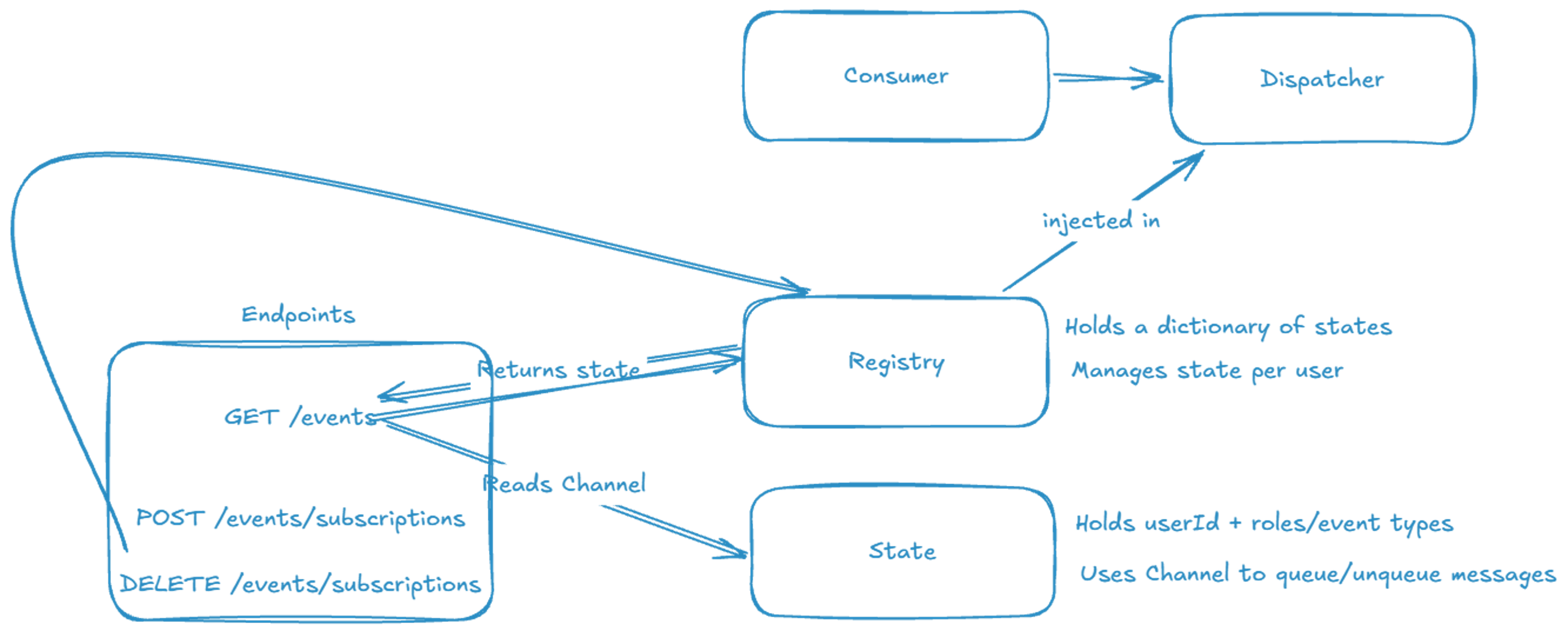
Our connection state will be created per user ID. It will serve two main purposes:
- Storing the roles and event types associated with that user.
- A
Channelto read from and write to.
Here’s the implementation:
public sealed class SseConnectionState
{
    public string UserId { get; set; } = string.Empty;
    public HashSet<string> Roles { get; } = new(StringComparer.OrdinalIgnoreCase);
    public HashSet<string> EventTypes { get; } = new(StringComparer.OrdinalIgnoreCase);
    private readonly Channel<SseItem<DemoEvent>> _events = Channel.CreateUnbounded<SseItem<DemoEvent>>(new UnboundedChannelOptions
    {
        SingleReader = true,
        SingleWriter = false
    });

    public bool TryQueueEvent(DemoEvent demoEvent) => _events.Writer.TryWrite(
        new SseItem<DemoEvent>(demoEvent, "message")
        {
            EventId = demoEvent.Id.ToString()
        });

    public IAsyncEnumerable<SseItem<DemoEvent>> ReadEventsAsync(CancellationToken cancellationToken = default) =>
        _events.Reader.ReadAllAsync(cancellationToken);

    public void Complete() => _events.Writer.TryComplete();
}
Connection registry
Our registry will keep in a list of connections and their state instance. The purpose of the registry is to keep track of theses connections and retrieve connections by user, role, event type, or across all connections. It will also be the entry point for adding or removing subscriptions from the state.
public sealed class SseConnectionRegistry
{
    private readonly ConcurrentDictionary<string, SseConnectionState> _connections = new(StringComparer.OrdinalIgnoreCase);

    public SseConnectionState Register(string connectionKey, string userId)
    {
        var state = _connections.GetOrAdd(connectionKey, _ => new SseConnectionState { UserId = userId });
        state.UserId = userId;
        state.Roles.Clear();

        var userRole = DemoUserCatalog.Get(userId)?.Role;
        if (!string.IsNullOrWhiteSpace(userRole))
        {
            state.Roles.Add(Normalize(userRole));
        }

        return state;
    }

    public void Remove(string connectionKey)
    {
        if (_connections.TryRemove(connectionKey, out var state))
        {
            state.Complete();
        }
    }

    public IEnumerable<SseConnectionState> GetAllConnections() => _connections.Values;

    public IEnumerable<SseConnectionState> GetConnectionsForUser(string userId)
    {
        ArgumentException.ThrowIfNullOrWhiteSpace(userId);

        foreach (var state in _connections.Values)
        {
            if (string.Equals(state.UserId, userId, StringComparison.OrdinalIgnoreCase))
            {
                yield return state;
            }
        }
    }

    public IEnumerable<SseConnectionState> GetConnectionsForRole(string role)
    {
        ArgumentException.ThrowIfNullOrWhiteSpace(role);
        var normalizedRole = Normalize(role);

        foreach (var state in _connections.Values)
        {
            if (state.Roles.Contains(normalizedRole))
            {
                yield return state;
            }
        }
    }

    public IEnumerable<SseConnectionState> GetConnectionsForEventType(string eventType)
    {
        ArgumentException.ThrowIfNullOrWhiteSpace(eventType);

        foreach (var state in _connections.Values)
        {
            if (state.EventTypes.Contains(eventType))
            {
                yield return state;
            }
        }
    }

    public void UpdateEventType(string connectionKey, string eventType, bool selected)
    {
        if (!_connections.TryGetValue(connectionKey, out var state))
        {
            return;
        }

        var normalizedEventType = Normalize(eventType);
        if (selected)
        {
            state.EventTypes.Add(normalizedEventType);
        }
        else
        {
            state.EventTypes.Remove(normalizedEventType);
        }
    }

    private static string Normalize(string value) => value.Trim();
}
Endpoints
With both the state and registry implemented, we can now add our endpoints. Since we’re working with SSE, we cannot communicate directly with the server over the same connection through which we receive events. Therefore, we’ll need separate endpoints for subscribing and unsubscribing from events.
app.MapGet("/events", (HttpContext httpContext, SseConnectionRegistry registry) =>
{
    var userId = httpContext.Request.Query["userId"].ToString();
    var connectionId = httpContext.Request.Query["connectionId"].ToString();
    if (string.IsNullOrWhiteSpace(connectionId))
    {
        connectionId = Guid.NewGuid().ToString();
    }

    var state = registry.Register(connectionId, userId);

    async IAsyncEnumerable<SseItem<DemoEvent>> StreamEvents(
        SseConnectionState streamState,
        string streamConnectionId,
        [System.Runtime.CompilerServices.EnumeratorCancellation] CancellationToken cancellationToken)
    {
        try
        {
            await foreach (var sseItem in streamState.ReadEventsAsync(cancellationToken))
            {
                yield return sseItem;
            }
        }
        finally
        {
            registry.Remove(streamConnectionId);
        }
    }

    return TypedResults.ServerSentEvents(StreamEvents(state, connectionId, httpContext.RequestAborted));
});

app.MapPost("/events/subscriptions", (string userId, string? eventType, SseConnectionRegistry registry, HttpContext httpContext) =>
{
    var connectionId = httpContext.Request.Query["connectionId"].ToString();
    if (string.IsNullOrWhiteSpace(connectionId))
    {
        return Results.BadRequest(new { error = "Missing connectionId." });
    }

    if (string.IsNullOrWhiteSpace(eventType))
    {
        return Results.BadRequest(new { error = "Provide eventType." });
    }

    registry.UpdateEventType(connectionId, eventType, true);

    return Results.Ok(new { userId, eventType, status = "subscribed" });
});

app.MapDelete("/events/subscriptions", (string userId, string? eventType, SseConnectionRegistry registry, HttpContext httpContext) =>
{
    var connectionId = httpContext.Request.Query["connectionId"].ToString();
    if (string.IsNullOrWhiteSpace(connectionId))
    {
        return Results.BadRequest(new { error = "Missing connectionId." });
    }

    if (string.IsNullOrWhiteSpace(eventType))
    {
        return Results.BadRequest(new { error = "Provide eventType." });
    }

    registry.UpdateEventType(connectionId, eventType, false);

    return Results.Ok(new { userId, eventType, status = "unsubscribed" });
});
Our SSE endpoint will read messages from the connected state’s channel and stream them back to clients. The other two endpoints will handle subscriptions.
Dispatcher
Now that clients can connect to the SSE endpoint and we have a way to manage connections, we need to implement message dispatching.
We’ll need to inject the registry into the dispatcher so it can retrieve connections by user, role, event type, or across all connections. It can then use the each connection’s state to write events to the channel that our main endpoint listens to, thereby pushing the message back to the client.
public sealed class SseMessageDispatcher
{
    private readonly SseConnectionRegistry _registry;

    public SseMessageDispatcher(SseConnectionRegistry registry)
    {
        _registry = registry;
    }

    public Task DispatchAsync(UserTargetedEventMessage message, CancellationToken cancellationToken) =>
        DispatchToTargetsAsync(
            message.Event,
            _registry.GetConnectionsForUser(message.UserId),
            $"user:{message.UserId}",
            cancellationToken);

    public Task DispatchAsync(RoleTargetedEventMessage message, CancellationToken cancellationToken) =>
        DispatchToTargetsAsync(
            message.Event,
            _registry.GetConnectionsForRole(message.Role),
            $"role:{message.Role}",
            cancellationToken);

    public Task DispatchAsync(EventTypeTargetedEventMessage message, CancellationToken cancellationToken) =>
        DispatchToTargetsAsync(
            message.Event,
            _registry.GetConnectionsForEventType(message.EventType),
            $"event-type:{message.EventType}",
            cancellationToken);

    public Task DispatchAsync(BroadcastEventMessage message, CancellationToken cancellationToken) =>
        DispatchToTargetsAsync(
            message.Event,
            _registry.GetAllConnections(),
            "broadcast",
            cancellationToken);

    private Task DispatchToTargetsAsync(
        DemoEvent demoEvent,
        IEnumerable<SseConnectionState> targetConnections,
        string targetDescription,
        CancellationToken cancellationToken)
    {
        cancellationToken.ThrowIfCancellationRequested();

        var targets = targetConnections.ToList();

        foreach (var connection in targets)
        {
            if (!connection.TryQueueEvent(demoEvent))
            {
                continue;
            }
        }

        return Task.CompletedTask;
    }
}
Consumer
Finally, our bus message consumer will inject our dispatcher and call the appropriate method based on the message it consumes.
public sealed class UserTargetedEventMessageHandler
{
    public static Task Handle(UserTargetedEventMessage message, SseMessageDispatcher dispatcher, CancellationToken cancellationToken)
        => dispatcher.DispatchAsync(message, cancellationToken);
}

public sealed class RoleTargetedEventMessageHandler
{
    public static Task Handle(RoleTargetedEventMessage message, SseMessageDispatcher dispatcher, CancellationToken cancellationToken)
        => dispatcher.DispatchAsync(message, cancellationToken);
}

public sealed class EventTypeTargetedEventMessageHandler
{
    public static Task Handle(EventTypeTargetedEventMessage message, SseMessageDispatcher dispatcher, CancellationToken cancellationToken)
        => dispatcher.DispatchAsync(message, cancellationToken);
}

public sealed class BroadcastEventMessageHandler
{
    public static Task Handle(BroadcastEventMessage message, SseMessageDispatcher dispatcher, CancellationToken cancellationToken)
        => dispatcher.DispatchAsync(message, cancellationToken);
}
SSE summary
As you can see, working with users and groups in SSE is not straightforward, but it’s still possible. Please note that in this demo I am only using in-memory registry, but you’ll probably need a more durable store in production - this implementation is for demonstration purposes only.
I want to emphasize that this is a simplified example for demonstration purposes. In a production system, you’ll need to consider additional factors, such as:
- scaling out
- sticky sessions
- stale connection cleanup
- reconnect behavior
- limits on memory and channel backlog
- How to handle multi-device / multi-tab users
Finally, if you’re a visual person and would like to see how everything is connected, here’s a diagram:
Final thoughts
It’s very clear that when it comes to SignalR it’s much easier to work and manage users and groups. However, that doesn’t mean that whenever you have to deal with this it’s better to use SignalR than SSE. If all what you need from your server is to tell your clients that something happened, SSE might still be worth considering.
Always consider the trade-offs between the two and evaluate what matters for your use case. Don’t choose the most powerful tool. Choose the simplest tool that solves your problem.
tags: csharp - aspnetcore - signalr - sse - dotnet - realtime - notifications - groups - users